

Automated Incident Management Pipeline: From Alert Email to Triaged Jira Ticket — Powered by AI
By Sagar Shankaran, Founder of CallSphere
Automated Incident Management Pipeline: From Alert Email to Triaged Jira Ticket — Powered by AI
An automated incident management pipeline detects, enriches, and routes production incidents without a human ever touching a dashboard. At Circini, we built one that does exactly that — taking a raw alert email and turning it into a fully written, fully triaged Jira ticket across seven automated stages, with AI generating the ticket content and Apache Airflow orchestrating every step.
Here is how the pipeline works, why it matters, and the exact stack behind it.
At a glance
- Seven-stage pipeline, fully connected from alert email to incident email — 100% automated, with no manual triage.
- AI does the writing:
SNOWFLAKE.CORTEX.COMPLETE()with GPT-4.1 generates a structured Jira JSON payload for every incident. - Apache Airflow runs the whole thing through a single DAG that coordinates five downstream tasks.
- Three notification channels — auto-created Jira tickets, an MS Teams alert, and a context-rich email — so the team can act immediately without checking any dashboard.
What is an automated incident management pipeline?
An automated incident management pipeline is a system that ingests production alerts, decides which ones are genuine incidents, enriches them with structured detail, and routes them to the right tools and people — all programmatically. Instead of an engineer reading alert emails, copying details into a ticket, and pinging the team, the pipeline performs every one of those steps end to end.
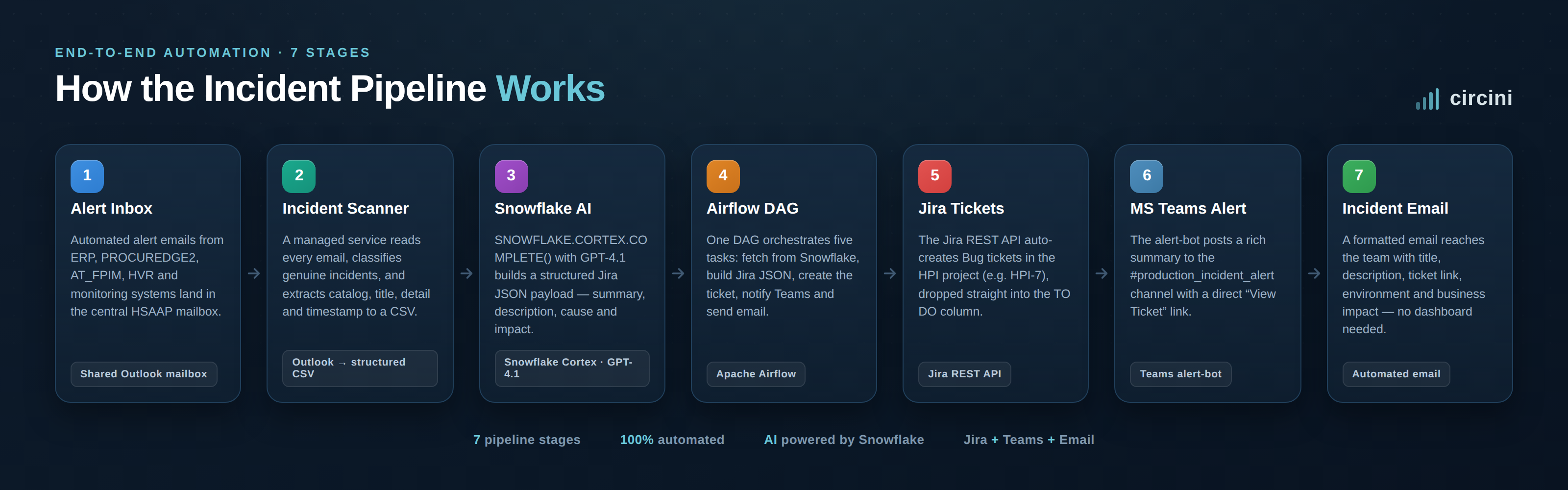
Circini's implementation, built for the HSAAP environment, connects seven stages: Alert Inbox → Incident Scanner → Snowflake AI → Airflow → Jira → MS Teams → Email. Each stage hands clean, structured data to the next.
Why automate incident management?
Manual incident triage is slow and easy to get wrong. Alerts pile up in a shared mailbox, real incidents hide among routine noise, and the same details get re-typed into a ticket before anyone is notified. Every one of those handoffs is a chance to lose time or miss something.
Automating the pipeline removes those handoffs entirely. In this build, every genuine incident becomes a tracked Jira ticket with an AI-written description, the team is alerted in MS Teams the moment it happens, and a formatted email lands with the full context attached — environment, business impact, and a direct link to the ticket. No dashboard to check, no manual steps, nothing to forget.
The 7-stage pipeline, step by step
flowchart LR
  A["Alert Inbox"] --> B["Incident Scanner"]
  B --> C["Snowflake AI (GPT-4.1)"]
  C --> D["Airflow DAG"]
  D --> E["Jira Tickets"]
  D --> F["MS Teams Alert"]
  D --> G["Incident Email"]
1. Alert Inbox — every alert lands in one place
The central HSAAP mailbox receives automated alert emails from multiple production services — ERP, PROCUREDGE2, AT_FPIM, HVR, and monitoring systems. These messages carry the raw signal: error details, reconciliation failures, and system warnings.
Hear it before you finish reading
Talk to a live CallSphere AI voice agent for IT support in your browser — 60 seconds, no signup.
2. Incident Email Scanner — separating real incidents from noise
A managed Incident Email Scanner connects to Outlook, reads every message, and classifies which ones are genuine incidents. For each real incident it extracts the catalog, title, detail, and timestamp, then writes structured records to a timestamped CSV file — turning messy inbox text into clean, queryable data.
3. Snowflake AI — GPT-4.1 writes the Jira payload
This is where the AI does the heavy lifting. A Snowflake SQL task calls SNOWFLAKE.CORTEX.COMPLETE() using GPT-4.1 to generate a structured Jira JSON payload for each incident — populating the project, issue type, summary, description, cause, and impact fields. The model writes the ticket so an engineer doesn't have to.
4. Airflow DAG — one orchestrator, five tasks
flowchart TD
  T1["1. Fetch incident from Snowflake"] --> T2["2. Transform into Jira JSON"]
  T2 --> T3["3. Create Jira ticket"]
  T3 --> T4["4. Notify MS Teams"]
  T4 --> T5["5. Send incident email"]
Apache Airflow coordinates the full pipeline through the dags_snowflake_jira_msteams_email DAG. The DAG runs five tasks in sequence: fetch the incident from Snowflake, transform it into Jira JSON, create the Jira ticket, notify MS Teams, and send the incident email. One orchestrator, complete visibility, repeatable every run.
5. Jira Tickets — auto-created and ready to triage
An Airflow task calls the Jira REST API to create Bug tickets in the HPI project. Each incident becomes its own tracked ticket — for example HPI-7 or HPI-8 — complete with the AI-generated description, and it lands directly in the TO DO column, ready for immediate triage.
6. MS Teams Alert — the team sees it instantly
The alert-bot Teams app posts a rich notification to the #production_incident_alert channel for every incident found. Each message includes the ticket summary and a direct "View Ticket" link, so whoever is on call can jump straight to the issue.
7. Incident Email — full context, zero dashboards
Finally, the system sends a formatted incident email to the team. It includes the incident title, description, Jira ticket link, environment, and business impact — everything needed to act immediately, without opening a single dashboard.
The results
The numbers tell the story simply. Seven stages run as one connected flow. The pipeline is 100% automated with no manual triage steps. GPT-4.1, called through Snowflake Cortex, writes every Jira payload. And three channels — Jira, MS Teams, and email — keep the whole team in the loop the moment something breaks.
The stack behind it
The pipeline is deliberately built on tools most engineering teams already run: a shared Outlook mailbox for intake, a managed scanner that outputs structured CSV, Snowflake Cortex with GPT-4.1 for AI generation, Apache Airflow for orchestration, the Jira REST API for ticketing, an MS Teams alert-bot for notifications, and automated email for delivery. No exotic infrastructure — just well-orchestrated, AI-assisted automation.
Still reading? Stop comparing — try CallSphere live.
See the IT support AI agent handle a real call — complete, industry-specific, and live in your browser. No signup.
Frequently asked questions
What does an automated incident management pipeline do? It ingests production alerts, filters out the noise to find genuine incidents, enriches each one with structured detail, and automatically creates tickets and notifications — replacing manual triage end to end.
How does AI generate the Jira tickets?
A Snowflake SQL task calls SNOWFLAKE.CORTEX.COMPLETE() with GPT-4.1 to produce a structured Jira JSON payload, including the summary, description, cause, and impact for each incident.
What does Apache Airflow orchestrate in this pipeline?
A single DAG (dags_snowflake_jira_msteams_email) runs five tasks: fetch the incident from Snowflake, build the Jira JSON, create the Jira ticket, notify MS Teams, and send the incident email.
How are incidents separated from routine alert noise? The Incident Email Scanner reads every message in the mailbox, classifies which are genuine incidents, and extracts the catalog, title, detail, and timestamp into a structured CSV before anything downstream runs.
How is the team notified when an incident is created? Two ways at once: an alert-bot posts a summary with a "View Ticket" link to the #production_incident_alert Teams channel, and a formatted email is sent with the ticket link, environment, and business impact.
Why automate incident management instead of doing it manually? Manual triage is slow and error-prone, with multiple handoffs where time is lost or details are missed. A fully automated pipeline tracks every incident, notifies the team instantly, and removes the need to monitor a dashboard.
Build incident automation that runs itself
If your team is still triaging production incidents by hand — reading alerts, writing tickets, and chasing notifications — this is the kind of pipeline that gives those hours back. Circini designs and ships AI-driven incident automation on the tools you already use.
Talk to Circini about automating your incident pipeline → www.circini.com

Written by
Sagar Shankaran· Founder, CallSphere
LinkedInSagar Shankaran is the founder of CallSphere, where he builds production AI voice and chat agents deployed across healthcare, hospitality, real estate, and home services. He writes about agentic AI, LLM engineering, and shipping voice agents that handle real calls in production.
Try CallSphere AI Voice Agents
See how AI voice agents work for your industry. Live demo available -- no signup required.



